Showing posts with label blogspot. Show all posts
Showing posts with label blogspot. Show all posts
Sunday, August 11, 2013


Monday, August 5, 2013
Wishlist for my Car
Few months ago, i get Honda City replaced Proton Saga BLM, since then i feel like i'm starting to become the car enthusiastic liao...want the car to get better even the car is already good enough. Till now,still not much modification can apply on the car yet because of budget problem. *Not changing the car in coming few years so will take really good care on current car. Now still do some funding, spend less and just allocate some portion for the "Car Modification Plan Funding" from my working salary.
Here are some wishlist that i wish to apply on my car:
Here are some wishlist that i wish to apply on my car:
Front Struct Bar*done- Rear ARB
- Stiff Ring
Performance Air Filter (K&N)*doneVS + Grounding Cable*done- Side mirror wrap - Cosmetic
- Windows pillar wrap - Cosmetic
Sport Rims*done- Soundproof
- Seat wrapping - Leather
- Bodykit
- Projector headlamp
- City LED tail lamp
Overall. 30% completed. If anyone know the best workshop that can help me achieve my wishlist, please do suggest me as well. And maybe anyone has part time job for pocket money, PM me as well. *I'm working full time right now.
Monday, November 12, 2012
Rims & Tires
yesterday was a really bad day for me. Thought my car having alignment problem, then sent to tire's shop for maintenance. Who knows, it's not just the alignment problem, tire's pattern not rotating in straight line..so that it's cause my car to move to one side. Then i request the sifu to check on my rim as well to make sure my rim is ok. My front rim crooked.
After talking to the sifu, decided to change 4 rims and 4 tyres which cost me bloody expensive. 4 mugen rims, 4 16“ continental tires. Spend about 2 hours in changing tyres, alignment, balancing and camber adjustment and finally done. I get continental umbrella as a gift. *I'm not impressed with the umbrella, they at least to give me one time free service & maintenance at their workshop lo..XD
Just a little promotion, I never try Continental tires before, but the one i change i think it worth the penny i pay for. MC 5 Max Comfort, it really comfort. But still, it cost me a very high price. I will post my rims and tires picture tonight.
I'm not enjoying to spend few thousands to modify my car unless it really necessary. It's a really tough for me when i need to spend so much in sudden. I will take really good care of my car~~ I really need to thanks my parents as well for supporting me~~
Friday, November 9, 2012
I'm Back
After a long long time, finally back to my blog again. 3 months ago, i went to China for working and in China.......they block most of the sites. Facebook?Blogger?Youtube? etc, and these are the websites i access most of the times. That's why i'm having trouble on accessing my blog. T_T
After back Malaysia, trying to catch my work and finally today feel a lil bit relief. Finally done ,most of my stuffs, but still lots of lines in my Need-To-Do list. Most of the stuff need to be settle by the next Monday since next week is the holiday week, Dewali and Awal Muharram. Even my boss not yet approve my leave. T_T . *cross finger.
After back from overseas, feel like my work load start increasing and the pressure are getting on me. Hope myself can cope with it. All is well.
Wish all the Indian's friends happy Deepavali and to all Muslim Friend, Happy Maal Hijrah
After back Malaysia, trying to catch my work and finally today feel a lil bit relief. Finally done ,most of my stuffs, but still lots of lines in my Need-To-Do list. Most of the stuff need to be settle by the next Monday since next week is the holiday week, Dewali and Awal Muharram. Even my boss not yet approve my leave. T_T . *cross finger.
After back from overseas, feel like my work load start increasing and the pressure are getting on me. Hope myself can cope with it. All is well.
Wish all the Indian's friends happy Deepavali and to all Muslim Friend, Happy Maal Hijrah
Saturday, September 8, 2012
Shanghai's Photo
Back to blogger again. Long time didn't update the blog because i'm in China, most of the websites like facebook, youtube, blogger are blocked. I just get my way to access to blogger. I will been in Shanghai, China for roughly 2.5 months for work.
I had shoot some quite nice photos t share...all photo shoot by Samsung Galaxy SIII...


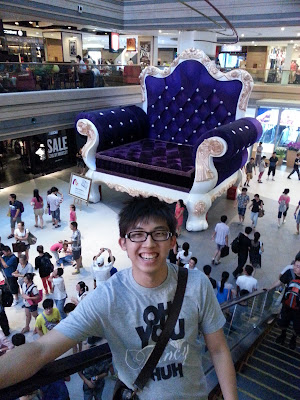


I had shoot some quite nice photos t share...all photo shoot by Samsung Galaxy SIII...
Panorama View


Sunday, July 1, 2012
Digi or U-mobile?
Currently have the dilemma on choosing the internet plan for my phone. Digi or u-mobile? I'm currently using the Digi smart plan which is quite good but every month i need to pay about RM 80++ for the bill. When i look at the u-mobile internet plan, found that it is quite worth it.
U-mobile RM 28/month for 1GB internet quota, free sms but no free call. Digi smart plan RM 48/month with no free sms and free call. I really want to move to u-mobile but some of friends said the coverage is not that good...blah blah blah..some said the internet speed is very fast..faster than Digi??
Which one do you think is the best and worth to use? Recommend me!!!!
U-mobile RM 28/month for 1GB internet quota, free sms but no free call. Digi smart plan RM 48/month with no free sms and free call. I really want to move to u-mobile but some of friends said the coverage is not that good...blah blah blah..some said the internet speed is very fast..faster than Digi??
 |
| U-Mobile |
 |
| Digi |
Which one do you think is the best and worth to use? Recommend me!!!!
Thursday, June 28, 2012
Most expensive app

The most expensive app in the Google Store. In the app, it shown the iPhone blowing the vuvuzela and it worth US $200. Max price in the Google Store already.
Check out for the video and other source about this shitty expensive app.
#View the app in Google Play
#View the app in Google Play
Wednesday, June 27, 2012
wanna be a dog?
An artist from Brazil Rodrigo Braga hunger to become a dog.
This is one of his works that he produced in 2004 [Compesation Fantasy]

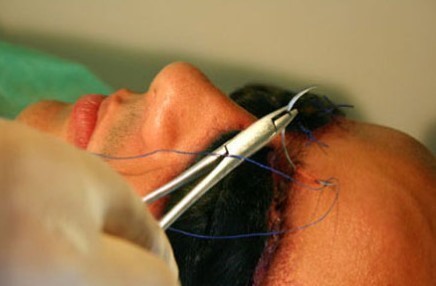
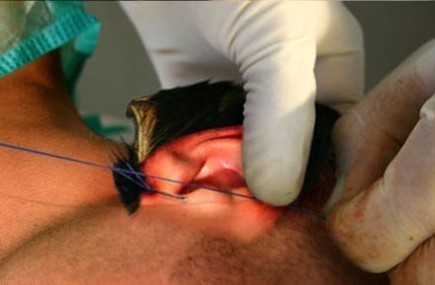
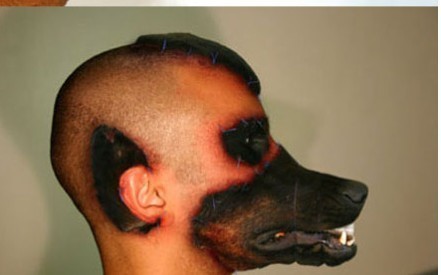
Found this news from Dogman
Tuesday, June 26, 2012
SG: Man punches, kicks 'pregnant' tourist
This incident happened in Singapore, a man PUNCHED and KICKS pregnant tourist just because of the small matter. F**** the guy, be gentleman a bit la...
 |
| i feel like doing this to the guy!!! |
CCTV Footage
Monday, June 25, 2012
1 UNITEN IT Carnival
Hey guy, if you are hunting for the low price and latest IT gadget, Please be prepared for this upcoming 1 UNITEN IT Carnival on this 10th - 12th July 2012. This event will be taking place at COIT, UNITEN. I know most people won't know where is UNITEN, i will include the map for ya.
Sunday, February 12, 2012
First day Review of EliteMovil Rom
Try this rom for 15 hours and what to say?!! This rom is as good as Gamerz rom. Can't really say which rom is the best because different custom roms are focusing on different things. Some optimize on gaming and some focus on multi-tasking. I can't really say EliteMovil or Gamerzrom is better, so it depends on the users. ^^
This rom is smooth and fast since it is overclocked to 1.2 Ghz by default. The kernel is a combination of semaphore, speedmod, talon and developers own tweaks that make this rom have the best performance. It preinstalled with No-Frill Cpu control so that you can change the clockspeed, governor and planner anytime. Once install this rom, it will auto convert all the files into ext4 format to increase the performance. With pikachu thunderbolt tweak, it make the overall rom more responsive.
Battery life. I flashed when 100%. On 3G all the time and download some apps, some gaming plus standby time,after 15 hours it still left with 55%. For now, the battery life is acceptable. For gaming, so far it perform as in my expectation. All the games I wish to play is run smoothly without lag and freeze. For those hihg-end games, you all need to test it coz I'm not that into gaming.
Some screen shots.


So far, i would say that this rom is good enough for my daily usage. Due to I need to work all days and can't spend more time on gaming, so battery life is important for now. Hope the battery can last for whole day and no need to bring extra charger to work.
Credit to Elitemovil for making this amazing rom.
This rom is smooth and fast since it is overclocked to 1.2 Ghz by default. The kernel is a combination of semaphore, speedmod, talon and developers own tweaks that make this rom have the best performance. It preinstalled with No-Frill Cpu control so that you can change the clockspeed, governor and planner anytime. Once install this rom, it will auto convert all the files into ext4 format to increase the performance. With pikachu thunderbolt tweak, it make the overall rom more responsive.
Battery life. I flashed when 100%. On 3G all the time and download some apps, some gaming plus standby time,after 15 hours it still left with 55%. For now, the battery life is acceptable. For gaming, so far it perform as in my expectation. All the games I wish to play is run smoothly without lag and freeze. For those hihg-end games, you all need to test it coz I'm not that into gaming.
Some screen shots.


 |
| Extended Power Menu |
 |
| ICS Dialer |
 |
| Setting |
 |
| Messaging |
So far, i would say that this rom is good enough for my daily usage. Due to I need to work all days and can't spend more time on gaming, so battery life is important for now. Hope the battery can last for whole day and no need to bring extra charger to work.
Credit to Elitemovil for making this amazing rom.
How to flash EliteMovil Rom??
Before you flash:
1.Backup all your important files and data
2. Download the JVU stock firmware and the ELITEMOVIL Rom. (Download link provided below)
3. Make sure your phone is fully charged.
4.Disable and kill the Kies process from task manager. It will interupt the flashing process.
5.This guide is strictly for Samsung Galaxy S i9000 only.*Caution
Update your phone at your own risk. I am not responsible on any damage of your devices arising from your usage on this tutorial or guide.
How to install JVU stock Firmware:
- First, you need to flash the JVU stock firmware using odin. >>JVU Stock Firmware<<
- After downloaded, extract the folder. The files included as followed:
- CODE_I9000XXJVU_CL851880_REV03_user_low_ship.tar.md5
- GT-I9000-CSC-MULTI-OXAJVU.tar.md5
- MODEM_I9000XXJVU_REV_00_CL1092175.tar.md5
- s1_odin_20100512.pit
- Odin3
- Launch the Odin3.
- Put all the files into the respective fields in Odin3.
- PIT: s1_odin_20100512.pit
- PDA: CODE_I9000XXJVU_CL851880_REV03_user_low_ship.tar.md5
- PHONE: MODEM_I9000XXJVU_REV_00_CL1092175.tar.md5
- CSC: GT-I9000-CSC-MULTI-OXAJVU.tar.md5
- Tick the Re-Partition
- Reboot your phone into download mode (Press volume down + Home +Power Button). Yellow triangle will shown when reboot into download mode.
- Connect your phone with PC via USB cable. Yellow ID:COM will shown if your device is detected.
- After all the files are set, then click Start and your phone will be installed with JVU stock firmware.
- After success, your phone will be reboot and JVU is installed. The setup wizard will shown up when as the phone rebooted, and make sure no boxes are tick. If the boxes are ticked as default, please un-tick it.
- Proceed to the next step. How to install custom kernel.
How to install custom kernel?
- Download the CF-Root kernel.>>CF-Root Kernel<<
- Assume the Odin3 is still open, click Reset to reset all the field.
- Put the downloaded ZIP files at PDA section
- PDA: CF-Root-XX_OXA_JVU_2.3.6-v4.3-CWM3RFS.tar
- Make sure the Re-partition is un-ticked.
- Reboot your phone into download mode (Press volume down + Home +Power Button). Yellow triangle will shown when reboot into download mode.
- Connect your phone with PC via USB cable. Yellow ID:COM will shown if your device is detected.
- After all the files is set, then click Start. It takes about 10 seconds and your phone will reboot.
- Proceed to Final step: How to install EliteMovil Rom.
How to install the EliteMovil Rom:
- You need to download the EliteMovil Rom. >>EliteMovil Rom<<
- Copy the downloaded EliteMovil Rom into the internal storage.
- Reboot your phone into Recovery Mode (Volume Up + Home + Power Button)
- Choose install zip files from sdcard > choose zip from sdcard > EliteMovil_V*_zip. It will take sometimes to install.
- This rom will auto convert system into ext4.
- This rom will wipe all. Once finish installed, do a restore from Go Launcher.
- Finally, Enjoy the wonder of the EliteMovil Rom.
- For more details, you can visit the developer blog: >>EliteMovil XDA<<
Here is the add-on.
Friday, January 20, 2012
Gamerz Rom Review
I had tried Gamerz rom for one week and I personally feel this rom is awesome. Before this, I tried other custom roms as well such as Oserx and Zuby's rom. But the end, I fell in love with Gamerz Rom.
In this ROM, all the bloat wares and RAM Hoggers applications are removed to obtain more free ram. And yes, with the Semaphore BigMem kernel, there is a lot of free ram obtained. Thus, it is butter smooth and not even minor lag during gaming. For the latest version of Gamerz rom, it is getting more and more free ram. For the list of RAM Hogging application, continue read here.
Gamerz rom is overclocked to 1.2 Ghz by default. Tegrak Overclocked is included in the rom to ease the overclocking process. I had tried gaming on this rom and zuby's rom. Both rom is OC to 1.2 ghz. The game 'Sprinkle' is used for testing. The gamerz rom perform amazingly without any lag at all. For Zuby's rom, it has some minor lag and sometimes even freeze and I need to restart my phone.
This rom has good battery life, I on 3G all the times, some gaming, on-line browsing, and phone idling for few hours, I still have about 60++% left.

Below is some screenshots of Gamerz Rom
In this ROM, all the bloat wares and RAM Hoggers applications are removed to obtain more free ram. And yes, with the Semaphore BigMem kernel, there is a lot of free ram obtained. Thus, it is butter smooth and not even minor lag during gaming. For the latest version of Gamerz rom, it is getting more and more free ram. For the list of RAM Hogging application, continue read here.
 |
| 147 MB free ram |
Gamerz rom is overclocked to 1.2 Ghz by default. Tegrak Overclocked is included in the rom to ease the overclocking process. I had tried gaming on this rom and zuby's rom. Both rom is OC to 1.2 ghz. The game 'Sprinkle' is used for testing. The gamerz rom perform amazingly without any lag at all. For Zuby's rom, it has some minor lag and sometimes even freeze and I need to restart my phone.
This rom has good battery life, I on 3G all the times, some gaming, on-line browsing, and phone idling for few hours, I still have about 60++% left.

Below is some screenshots of Gamerz Rom
 |
| Galaxy Note Lockscreen |
 |
| Home screen |
 |
| App drawer |
 |
| About Phone |
For the keyboard, it use ICS keyboard but is unable to save new words into dictionary because it been removed due to ram hog. Need to flash the cwm package provided by the developer to use it. The network location and angry gps are removed because of ram hog. The cwm packages are provided here. This affect me much because I always use Foursuqare and now Foursquare unable to detect my location.
Overall, I loved this rom so much and I personally recommend it to those who like gaming using their phone. It gives me butter smooth and fast experience, long-lasting battery and superb gaming experience. I will totally stick to this rom and hope it will getting better and better.
Credit to Burakgon for making this amazing rom.
How to flash Gamerz Rom, continue reading here
For more details, visit >Gamerz Rom Official<
Wednesday, January 18, 2012
Gamerz Rom
Changelog
-Stabilized CSC and added Sim Toolkit app. Now your APN's will be setted automatically with no problem. (For who has data issues)
-Changed system sounds with not annoying ones. (Battery full, Charger connected, Low battery)
-Wifi scan interval is 150 second now. I tried 3 seconds and it's not faster to connect. It already scanning when you enable wifi first time. Looks like decreased CPU overhead because of wifi scans and imporives speed and battery life during wifi on.
-Reverted to JVT modem. JVU modem has terrible bugs.
-Semaphore app deleted really this time. (Playing with it corrupts the scripts, LMK settings and decreasing performance. I added important and best scripts for performance and everything. You musn't play with it!!!!)
-Googleservicesframework.apk is replaced from 2.3.7 one. (More ram friendly google services)
-Fonts are ROBOTO by default.
-Changed dbdata of adw launcher settings. Disabled ICS icon theme. Already our icons are ICS. No need for third party. (+3 mb ram)
For full change log of other version, please visit >Gamerz Rom Official<
How to install Gamerz Rom:
For those who has the previos version of Gamerz ROM,
- Download the latest version of>Gamerz Rom v2.5<.
- Copy the downloaded rom into your internal storage.
- Reboot your phone into Recovery Mode (Volume Up + Home + Power button)
- Choose install zip from sdcard > choose zip from sdcard > Gamerz Rom v2.*.
- Done! Enjoy the wonder of Gamerz Rom.
- *Wipe if you want fresh rom.
For those who from other Rom other than Gamerz rom:
Read this > How to install Gamerz Rom
Android apps that HOGS RAM
Below is a list of apps that i got from the Gamerz Rom developer, Burakgon XDA thread. He had made a list of the apps that has the high ram usage and will cause lag to your phone. For more details and recommendations, can visit his thread >Gamerz Rom Blacklist Apps<
- Facebook (Sometimes consuming 60mb of ram!)
- Viber
- Google Maps
- Poweramp (Headphone button service)
- Facebook Messenger
- Hotmail SEVEN
- Vitamio
- Tango
- Rom Manager
- Rom Toolbox
- Script manager
- Voice Search (Google)
- Go weather
- Beautiful Widgets
- Fancy Widgets
- Accuweather & Accuweather quick
- Photofunia (I saw this on terminal with ps command)
- Go keyboard (Ram hog and has 3 background services + connecting internet)
- Blood & Glory (Push service)
- Gun Bros (Push service)
- Eternity Warriors (Push service)
- GT Racing (Push service)
- Go launcher (Sometimes using main memory + cached memory too much ram for a basic launcher)
- Norton security (useless)
- AVG (useless)
- Evernote
- Cach notes (3 services)
- Battery indicator & widget (and apps like that)
- Go!Chat for Facebook
- Google Goggles (Starts on boot) (Saw on terminal)
- Volume Control +
- Magic Locker
- Milocker
- Agile Lock
I will also try to find out apps that has high ram usage and add into the list.
Gamerz Rom v2.0
For the Gamerz Rom v2.0, some people including me faced the youtube force close problem and unable to add new words into dictionary.
To solve this problem, flash the newer version of Gamerz Rom v2.2, this will solve the youtube force close problem. I will provide the tutorial on how to flash the newer version of Gamerz Rom later. Stay tune.
For the user dictionary, please flash the CWM package provided by Burakgon.
Tuesday, January 17, 2012
How to flash Gamerz's ROM
I had personally tested this rom and it is really fast, stable and smooth. About the battery life, i on 3G for the whole day, some gaming, call and messaging, it can last me whole day without charging it. I strongly recommend this rom to those who like to play all those high end games. This rom is also suitable for daily usage.
THIS ROM WILL ALLOW YOU TO PLAY ALL HIGH-END GAMES SMOOTHLY.
-Semaphore Kernel (353mb ram)
-Speedmod color and sharpness fixes
-Voodoo Sound v10
-CPU Overclocked to 1200mhz as default.
-Touchscreen sensivity increased for better gaming.
-ICS like statusbar and toggles with battery percentage (a bit modded and looks better)
-ICS keyboard
-ICS Animations, CRT Off and other fancy stuff.
-ADW Launcher (ICS themed)
-Green colors on rom changed with ics blue. No ugly green progressbar or something never again.
-Deleted the bloatware which runs on background and eats ram.
-Used thunderbolt scripts and CFS settings for better smoothness and 3D performance.
-Zipalign script to zipalign apps on startup.
-No EXT4 because EXT4 has more cpu overheads than RFS. This casues lags on games. RFS IS FASTER AT ALL.
-200mb ram free on startup. Clean memory with task manager to have more.
80mb LMK for better ram management during gaming.
Visit their page for the change log. >>Gamerz Rom Page<<
Before you flash:
1.Backup all your important files and data
2. Download the JVU stock firmware and the Gamerz Rom. (Download link provided below)
3. Make sure your phone is fully charged.
4.Disable and kill the Kies process from task manager. It will interupt the flashing process.
5.This guide is strictly for Samsung Galaxy S i9000 only.*Caution
Update your phone at your own risk. I am not responsible on any damage of your devices arising from your usage on this tutorial or guide.
How to install JVU stock Firmware:
- First, you need to flash the JVU stock firmware using odin. >>JVU Stock Firmware<<
- After downloaded, extract the folder. The files included as followed:
- CODE_I9000XXJVU_CL851880_REV03_user_low_ship.tar.md5
- GT-I9000-CSC-MULTI-OXAJVU.tar.md5
- MODEM_I9000XXJVU_REV_00_CL1092175.tar.md5
- s1_odin_20100512.pit
- Odin3
- Launch the Odin3.
- Put all the files into the respective fields in Odin3.
- PIT: s1_odin_20100512.pit
- PDA: CODE_I9000XXJVU_CL851880_REV03_user_low_ship.tar.md5
- PHONE: MODEM_I9000XXJVU_REV_00_CL1092175.tar.md5
- CSC: GT-I9000-CSC-MULTI-OXAJVU.tar.md5
- Tick the Re-Partition
- Reboot your phone into download mode (Press volume down + Home +Power Button). Yellow triangle will shown when reboot into download mode.
- Connect your phone with PC via USB cable. Yellow ID:COM will shown if your device is detected.
- After all the files are set, then click Start and your phone will be installed with JVU stock firmware.
- After success, your phone will be reboot and JVU is installed. The setup wizard will shown up when as the phone rebooted, and make sure no boxes are tick. If the boxes are ticked as default, please un-tick it.
- Proceed to the next step. How to install custom kernel.
Warning. Do not tick any box at first boot on set-up wizard!!! You can change the setting manually later. If the box is tick as default, please un-tick it.
How to install custom kernel?
- Download the semaphore kernel.>>Semaphore Kernel<<
- Assume the Odin3 is still open, click Reset to reset all the field.
- Put the downloaded ZIP files at PDA section
- PDA: Semaphore_kernel_JVU_2.5.0beta.tar
- Make sure the Re-partition is un-ticked.
- Reboot your phone into download mode (Press volume down + Home +Power Button). Yellow triangle will shown when reboot into download mode.
- Connect your phone with PC via USB cable. Yellow ID:COM will shown if your device is detected.
- After all the files is set, then click Start. It takes about 10 seconds and your phone will reboot.
- Semaphore icon will be added in your phone menu. Go to setting and check the kernel version.
- Proceed to Final step: How to install Gamerz Rom.
 |
| Kernel version: stratosk@semaphore |
How to install the Gamerz Rom:
- You need to download the Gamerz Rom. >>Gamerz Rom<<
- Copy the downloaded Gamerz Rom into the internal storage.
- Reboot your phone into Recovery Mode (Volume Up + Home + Power Button)
- Wipe data/factory reset
- Wipe cache partition
- Go to advanced > Wipe Dalvik Cache
- After done all the cleaning, choose install zip files from sdcard > choose zip from sdcard > Gamerz Rom. It will take sometimes to install.
- Finally, Enjoy the wonder of the Gamerz Rom.
- *Don't flash any script since it already included in this rom.
- For more details, you can visit the developer blog: >>Gamerz Rom Blogger<< || >>Gamerz Rom XDA<<
Credit to burakgon for making this amazing rom.
Subscribe to:
Posts (Atom)